
Filename Ninja
A cross-platform desktop application for safe, bulk file renaming. Built with Python and Qt.
Windows
Linux
macOS
A cross-platform desktop application for safe, bulk file renaming. Built with Python and Qt.
Everything you need for powerful, safe batch file renaming.
Rename files and directories in bulk. Process subdirectories recursively, including nested items.
Preview all rename results before applying any changes. See exactly what will happen before you commit.
Powerful regex-based search and replace workflows for advanced pattern-based transformations.
Convert filenames to lower, upper, title case, and more. Normalize file extensions effortlessly.
Handle international filenames with full Unicode support. Remove accents and normalize special characters.
Highly configurable sequential numbering with custom start, increment, zero-fill, and per-folder restart.
Built-in safeguards detect naming conflicts before they happen. Undo operations to revert changes.
Efficient workflows with keyboard shortcuts. Persistent configuration for commonly used patterns and preferences.
Extensive settings for behavior, UI options, logging, and history. Save patterns for repeated use.
Get up and running in minutes.
Concrete workflows where Filename Ninja saves time and reduces mistakes.
Rename files like IMG_4831.JPG to consistent project naming such as wedding_2026_0001.jpg, while normalizing extensions and preserving sequence.
Apply a shared naming format across exported reports (for example team_report_YYYY-MM-DD) so folders stay sortable and easy to search.
Clean special characters, enforce zero-filled numbering, and generate deterministic file names before analysis pipelines or data sharing.
Use regex to extract track or episode identifiers and rewrite files into structured names that media servers can index correctly.
Rename deliverables in bulk with client prefixes and version tags (for example acme_brandkit_v03) right before handoff.
Normalize mixed historical naming styles in large folders safely using preview, conflict detection, and undo support.
A glimpse of the Filename Ninja interface.
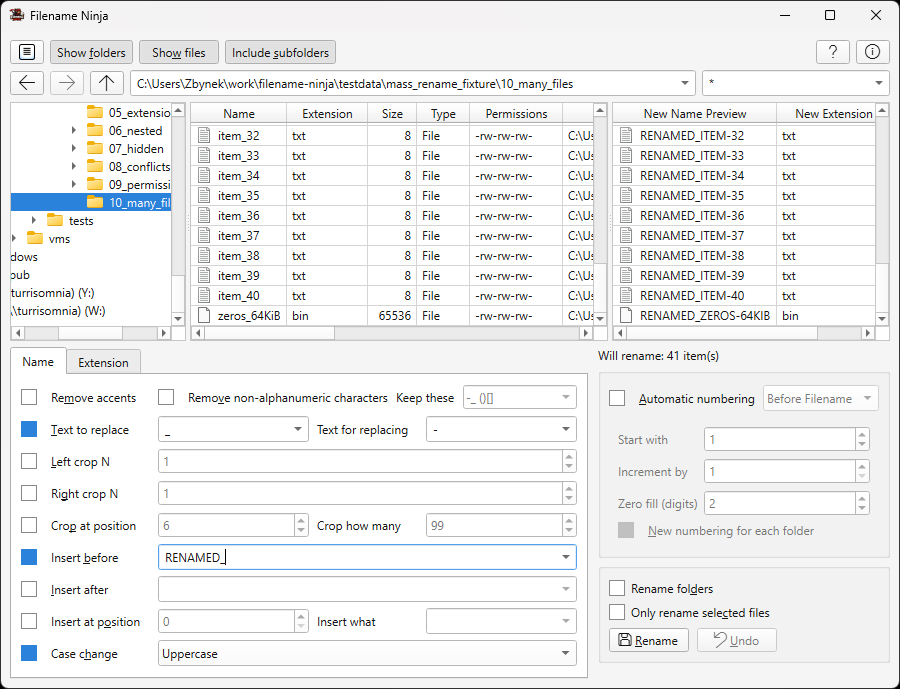
Browse folders, configure rename rules, and preview results — all in one view.
 Windows
 Linux
Linux
 macOS
macOS